
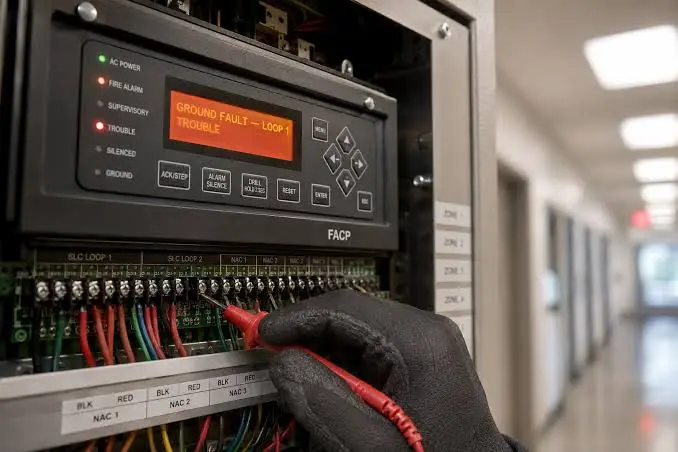
It is 7 AM. A yellow light is glowing on the fire alarm panel and a small buzzer is chirping every few seconds. Nobody is evacuating, nothing is on fire, but everyone who walks past asks the same question: “Is that something we should worry about?”
The answer is yes, though not in the way an alarm demands. Fire alarm panel trouble codes are the system’s early warning that something has failed, disconnected, or drifted out of spec. Left unresolved, a minor trouble can become a system that does not work when it matters. Dealt with promptly and documented properly, it becomes a routine maintenance item.
This guide explains how to read fire panel error codes, the difference between alarm, trouble, and supervisory signals, what the most common troubles mean, what a facilities team can safely check, and when to call a licensed fire alarm technician. It also covers how to log every event so the same fault does not keep coming back.
Alarm, Trouble, and Supervisory: Know the Difference
Fire alarm panels generate three kinds of signals. Confusing them leads to the wrong response, so make sure everyone who might stand in front of the panel can tell them apart.
| Signal | What it means | Typical response |
|---|---|---|
| Alarm | A fire condition has been detected or initiated, for example by a smoke detector, heat detector, or manual pull station | Evacuate and follow your emergency procedures, including notifying the fire service |
| Trouble | A fault in the system itself: something is broken, disconnected, or out of range. The system may still partly work | Acknowledge, record, investigate, and correct promptly. No evacuation required |
| Supervisory | A monitored condition has changed, such as a sprinkler valve position, low air or water pressure in a suppression system, or a similar status | Acknowledge, inspect the monitored equipment, and restore the normal condition |
A trouble signal is not a fire. But a system in trouble is a system that may not detect or announce one, which is why standards such as NFPA 72 expect trouble signals to be acknowledged and corrected promptly rather than left to sit.
Why Fire Panel Error Codes Look Different on Every Panel
There is no universal list of fire alarm panel trouble codes. Manufacturers use their own wording, menus, and numbering. Some panels show plain-English descriptions on a backlit screen. Others use LED indicators and a keypad. Distributed systems may report troubles from remote cabinets rather than the main panel, and each entry may include a cabinet, card slot, or channel.
Three practical points follow:
- Search for the message on your own panel. The terms in this guide are common, but your panel’s wording will differ.
- Use the manufacturer’s documentation. Keep the operation manual and programming record for each panel with the asset record.
- Learn your panel’s event history. Most addressable panels keep a time-stamped log of past events that shows whether a fault is new, intermittent, or repeating.
The Panel’s Sequence: Acknowledge, Read, Record
When a trouble appears, the first steps are almost always the same:
- Acknowledge the event to silence the local buzzer. This does not fix anything. It simply stops the sound.
- Read the message in full. Note the description, the device address or circuit, the loop or cabinet, and the time.
- Scroll through all active events. There may be more than one, and the first may explain the others.
- Photograph the display before touching anything else.
- Check the event history for earlier occurrences of the same message.
Only then should you decide whether it is something your team can safely check or something that needs a licensed technician.
Common Fire Alarm Panel Trouble Codes Explained
AC Power Trouble
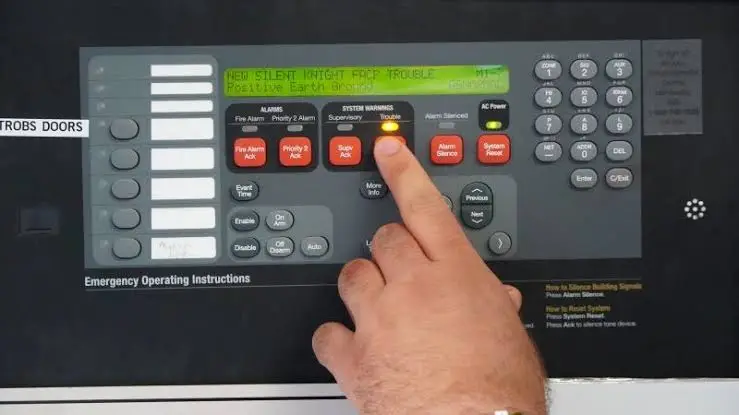
What it means: The panel has lost or detected a problem with its normal mains supply and is running on its backup batteries.
Why it matters: Batteries only last so long. If mains power does not return, the system will eventually shut down.
What a facilities team can check:
- Is there a building power outage or a tripped breaker?
- Is the panel’s dedicated circuit breaker on, and is it clearly labelled and secured?
- Was electrical work done recently that might have switched it off?
If power is restored and the trouble clears, record it. If the trouble persists with power present, a technician needs to inspect the panel’s power supply.
Low Battery or Battery Trouble
What it means: The backup battery voltage has dropped below the panel’s threshold, or the panel cannot detect a battery at all.
Why it matters: This is one of the most common troubles in the field. The batteries are what keep the system alive during a power outage. Sealed lead-acid batteries in panels commonly have a service life of around three to five years, and their capacity declines with age and heat.
What to do:
- Check the battery installation date, which should be marked on the battery.
- Do not simply reset the trouble and carry on. A low battery needs testing and usually replacement.
- Have batteries replaced by a qualified technician, in matched sets where required, and record the date.
Battery Charger Trouble
What it means: The charging circuit is not charging the batteries correctly. This is separate from the condition of the batteries themselves.
What to do: This is a technician item. A failed charger will eventually leave you with flat batteries even if new ones are installed.
Ground Fault (Earth Trouble)
What it means: A conductor has made unintended contact with a grounded surface, creating a path for current where one should not exist.
Why it matters: Ground faults can interfere with correct operation and, in some cases, cause nuisance alarms. They are also notoriously tricky to trace, and more than one may exist at the same time.
What to do:
- Look for recent construction, ceiling work, water leaks, or damaged conduit near the affected area.
- Check whether the panel identifies the circuit or loop segment involved.
- Check the event history. A ground fault that appears, clears, and reappears usually points to a loose or intermittently damaged wire.
Isolating a ground fault involves working circuit by circuit, which is a job for a fire alarm technician.
Open Circuit or Open Loop
What it means: Continuity has been lost on a circuit. It might be on a notification appliance circuit, which powers horns and strobes, or on an initiating device circuit or addressable loop.
Typical causes: A cut or damaged wire, a loose terminal, a failed end-of-line resistor, or a failed device.
What to do:
- Ask whether any ceiling, wall, or electrical work has taken place recently near the affected zone.
- Note which circuit or loop the panel reports.
- Leave the diagnosis to a technician, who will measure and isolate the break methodically.
Because an open circuit means part of the system may not work, treat it as high priority and ask your provider whether any interim measures, such as notifying occupants or arranging a fire watch, are required.
Device Missing or Device Communication Failure
What it means: On an addressable system, the panel can no longer communicate with a specific device. It might be a detector, module, or pull station.
Common causes: The device was removed or loosened from its base, the device has failed, there is a wiring problem on the loop, or the address was corrupted.
What a facilities team can check:
- Visit the device location listed by the panel. Is the detector missing, loose, or covered?
- Has painting, ceiling tile replacement, or cleaning disturbed it?
- Take a photo and record the address.
Replacement devices must match the type and address of the original and be tested afterwards, which is licensed technician work.
Smoke Detector Trouble and Sensor Fault
What it means: A detector has reported a fault, or its sensitivity has drifted out of range.
Common causes: Dust or contamination, physical damage, a failed sensor, or in some systems a wiring break monitored by a termination resistor.
What to do: Note the address and location, check for visible damage or dust build-up, and arrange cleaning or replacement through your provider. Frequent detector troubles in the same area can point to a dusty environment, nearby construction, or humidity problems.
Supervisory Trouble
What it means: There is a problem with the circuits that monitor other life safety equipment, such as sprinkler valves, flow and tamper switches, or similar devices.
Why it matters: A supervisory fault may mean a sprinkler control valve has been closed or a monitored pressure has changed, which can leave a protection system impaired.
What to do: Treat it seriously. Inspect the monitored equipment if it is safe and within your remit, report the condition to your fire protection provider, and follow your impairment procedure if protection is affected.
Panel Trouble
What it means: The control panel itself has detected an internal fault, which could involve a circuit board, a software issue, or a wiring problem.
What to do: Call your fire alarm provider. This is not a facilities team repair.
Communication and Reporting Troubles (IP, Ethernet, DACT)
What it means: The panel cannot send alarm, trouble, or restoration messages to the monitoring station through one of its reporting paths. Modern panels may report over an IP or Ethernet connection and have a backup path, often through a digital alarm communicator transmitter (DACT) or a cellular communicator.
Why it matters: If a reporting path is down, you may be relying on the backup without realising. If both fail, nobody outside the building will hear about an alarm.
What a facilities team can check:
- Has the network switch, router, or internet connection been changed or switched off?
- Has the phone line or cellular service been disconnected or changed provider?
- Are cables physically intact and plugged in?
Tell your monitoring company and fire alarm provider as soon as possible so they can confirm that signals are reaching the station.
Maintenance Required
What it means: The panel or a detector is flagging that routine maintenance or servicing is due, for instance because a detector’s sensitivity is approaching a limit.
What to do: Treat it as a prompt to schedule servicing rather than a nuisance message to clear. Record it and book the work through your normal inspection and testing programme.
Restore Messages
Every trouble message has a counterpart “restore” message. When the condition clears, the panel logs the restoration and sends it to the monitoring station. That pair of events, trouble and restore, is what builds the picture of how long a fault lasted and how often it recurs.
Quick Reference: What You Can Do vs. What to Escalate
| Trouble | Facilities team can check | Escalate to a licensed technician |
|---|---|---|
| AC power trouble | Breaker, building power | Power persists after mains is confirmed present |
| Low battery | Battery age and label | Always: testing and replacement |
| Battery charger trouble | None | Always |
| Ground fault | Recent work or damage nearby | Always: isolation and repair |
| Open circuit | Recent work near zone | Always |
| Device missing or communication failure | Visual check at the device | Replacement, addressing, testing |
| Smoke detector trouble | Visual check, dust or damage | Cleaning, replacement, sensitivity testing |
| Supervisory trouble | Inspect monitored equipment if safe | Any impairment or valve condition |
| Panel trouble | None | Always |
| IP, DACT, or reporting trouble | Network and phone line status | Confirm signals reach the station |
| Maintenance required | Schedule the service | Perform the servicing |
What Not to Do
Do not silence and ignore. Acknowledging stops the buzzer. It does not clear the fault.
Do not reset repeatedly. A reset may clear a message temporarily, but it removes your chance to diagnose it and can hide an intermittent fault.
Do not disconnect devices, bypass circuits, or open the panel unless you are a qualified, authorised person.
Do not leave a system impaired without a plan. If part of the system is out of service, follow your impairment procedure and your insurer and local authority requirements, which may include a fire watch and notification of the monitoring company.
Do not assume a trouble is minor. Some troubles reduce protection immediately. Others warn of a failure that will happen later. Both need action.
A Simple Response Procedure for Facilities Teams
Build this into a one-page procedure and keep it next to every panel and in your maintenance system.
- Confirm the signal type. Alarm, trouble, or supervisory.
- Acknowledge to silence the audible signal.
- Record the details: time, full message, address or circuit, and a photo of the display.
- Check the event history for earlier occurrences.
- Do a safe visual check where appropriate: power, obvious damage, recent work, network connections.
- Contact your fire alarm provider with the recorded details.
- Notify the monitoring company if the system may be impaired or if signals may not be transmitting.
- Follow your impairment procedure if protection is reduced.
- Confirm restoration. Verify that the panel has returned to normal and that the restore signal was received.
- Close the loop. Log the cause, the fix, who did it, and when.
Why Intermittent Troubles Deserve Extra Attention
The most dangerous trouble is the one that clears itself. A ground fault that appears at night and disappears by morning, a detector that drops off the loop for ten minutes, or a communication fault that corrects itself can easily be dismissed. But intermittent faults usually point to something physical: a loose terminal, a damaged cable, moisture, or a device that is gradually failing.
The event history is your best tool here. Review it regularly rather than only after a fault. Look for:
- The same device or circuit appearing repeatedly
- Faults that cluster around weather events, cleaning schedules, or building work
- Troubles that always clear at a particular time of day
- Batteries or power supplies reporting minor issues before a full failure
Each repeat is evidence. Record it, and ask your provider to investigate the pattern rather than treating every occurrence as a one-off.
Building Trouble Response Into Your Maintenance Program
Responding quickly matters. Reducing the number of troubles matters more. A strong program includes:
Scheduled inspection and testing. Fire alarm systems need routine inspection, testing, and maintenance by qualified personnel at the frequencies required by your local code and authority. Our guide on how to start a preventive maintenance program explains how to build the framework that keeps these tasks on the calendar.
Battery management. Record installation dates and plan replacement before the end of service life rather than waiting for a battery trouble.
Regular panel checks. A quick monthly look at the panel display for active troubles, and a review of the event log, catches issues early.
Contractor management. Track your fire alarm provider’s contract, visit dates, reports, and any deficiencies they identified.
Change control around building work. Before ceiling, electrical, or construction work begins near detectors and wiring, notify the person responsible for fire alarm maintenance so devices are protected and any impairment is planned.
Documentation. Missing records can be as serious as a missed test during an inspection. Every trouble, test, and repair should leave a dated record.
How a CMMS Makes Fire Panel Error Codes Easier to Manage
Paper logs and shared spreadsheets make it hard to see patterns. A CMMS (computerised maintenance management system) helps by:
- Turning every trouble into a work order with the code, location, photo, and time attached
- Storing the panel’s manuals and documentation against the asset, accessible from a phone
- Flagging repeat events on the same device, circuit, or panel
- Scheduling inspections, battery replacements, and tests automatically
- Keeping contractor reports and certificates in one searchable place for audits
If you want a closer look at how this works, read why a CMMS is essential for preventive maintenance and how a CMMS can streamline preventive maintenance. The same logic applies to other equipment that signals problems through codes; see our guide on chiller fault codes for how to turn alarms on mechanical plant into a maintenance record. And if you are evaluating platforms, FacilityBot’s CMMS software page shows how work orders, assets, and compliance records fit together.
Common Mistakes With Fire Alarm Trouble Codes
Treating “acknowledge” as “resolved.” Silencing the buzzer is the first step, not the last.
Ignoring a trouble because the system “still seems to work.” A partly working system is still impaired.
Clearing the event before recording it. Without the timestamp, address, and photo, the diagnosis starts from scratch.
Replacing batteries only when they fail. Plan around their age.
Not telling the monitoring company. If signals cannot reach the station, someone needs to know.
Letting building work disturb detectors and wiring unnoticed. Many device and circuit troubles follow renovations.
Never reviewing the event history. Intermittent faults hide there.
Having no written procedure. When a trouble appears at 7 AM, nobody should have to guess what to do.
Frequently Asked Questions
What are fire alarm panel trouble codes?
Fire alarm panel trouble codes are messages that a fire alarm control panel displays when it detects a fault in the system, such as a wiring problem, a failed device, a power issue, or a communication failure. They are different from alarm signals, which indicate a possible fire.
What do fire panel error codes usually mean?
Most fire panel error codes fall into a handful of families: power and battery troubles, wiring faults such as open circuits and ground faults, device or sensor problems, supervisory conditions, communication and reporting failures, and maintenance prompts. Exact wording varies by manufacturer, so refer to your panel’s documentation.
Is a trouble signal an emergency?
A trouble signal is not a fire, and it does not usually require evacuation. But it indicates that the system is faulty and may not work fully, so it needs prompt attention.
What is the most common fire alarm trouble?
Battery trouble is among the most common. Backup batteries age, lose capacity, and need replacement on a schedule, so a low battery or battery trouble message is a frequent service call.
Can I reset a fire alarm panel after a trouble?
You can acknowledge a trouble to silence the buzzer, and some troubles clear on their own when the condition is corrected. But resetting without understanding the cause hides the problem, so record the details first and involve your fire alarm provider for anything you cannot explain.
What is the difference between a trouble and a supervisory signal?
A trouble signal means the fire alarm system itself has a fault. A supervisory signal means a monitored condition, such as a sprinkler valve position or pressure, has changed. Both need attention, but they point to different problems.
Why does the same trouble keep appearing and clearing?
Intermittent troubles usually indicate a physical cause such as a loose connection, damaged cable, moisture, or a device that is failing. Review the panel’s event history and ask your technician to investigate the pattern.
Who should repair fire alarm troubles?
Facilities teams can acknowledge, document, and carry out safe visual checks. Diagnosis and repair of wiring, devices, batteries, and the panel should be done by a qualified fire alarm technician, with results documented.
Do I need to tell anyone when there is a trouble?
Check your local requirements, your insurer’s conditions, and your service contract. In many cases you should notify your fire alarm provider, and the monitoring company if signals may not be reaching the station or if the system is impaired.
How can I reduce the number of fire panel troubles?
Maintain batteries on a schedule, keep detectors clean and protected during building work, schedule regular inspection and testing, review the event history, and document every trouble so that repeat issues are investigated rather than repeatedly cleared.
Simplify Fire Alarm and Facility Management with FacilityBot
A trouble code is only useful if someone sees it, understands it, and records what was done. FacilityBot helps facilities teams do that consistently. Our facilities management software keeps fire alarm assets, inspection schedules, work orders, and contractor reports in one place, so no trouble gets lost between shifts. As a facility management solution built for lean teams, it supports planned testing and battery replacement alongside reactive repairs. Because it is cloud based CMMS software, technicians can log a panel message, attach a photo of the display, and close out the job from a phone beside the panel. And with built-in fault reporting software, staff and occupants can report a chirping detector or a blinking panel the moment they notice it, so problems reach your team before they become compliance gaps. Book a demo to see how FacilityBot can help you stay on top of fire alarm panel trouble codes and fire panel error codes.
