
Somewhere in your maintenance records is a piece of equipment that has failed the same way three times this year. Each time, someone patched it, logged the repair, and moved on to the next fire. Nobody stopped to ask why a “preventive” program let the same failure happen three times, because nobody had time to ask. That is usually the moment a facilities team starts searching for how to do preventive maintenance properly, rather than just having a PM schedule that exists on paper.
The honest answer is that most facilities are not actually short on preventive maintenance tasks. They are short on preventive maintenance that reflects reality. Calendars are full, checklists are written, and PM work orders get generated every month, yet emergency work keeps eating the budget. Learning how to do preventive maintenance the right way is less about adding more tasks and more about building the right tasks, at the right interval, for the right assets, in a way your team can actually sustain.
This guide breaks that process down into a sequence you can follow from a blank slate, or use to audit a program that already exists but isn’t working the way it should.
What Preventive Maintenance Actually Means
Preventive maintenance is planned work, such as inspection, cleaning, lubrication, adjustment, calibration, and the replacement of wear components, carried out before an asset fails rather than after. It is scheduled either by a fixed time interval (monthly, quarterly, semi-annual) or by a usage-based meter, such as run hours, mileage, or production cycles.
That definition sounds simple, and the mechanics of scheduling it are simple. What makes preventive maintenance hard is everything around the scheduling: deciding which assets deserve attention, writing tasks that hold up to real operating conditions, and getting a rushed technician and a production manager to agree that the work is worth the downtime. A well-built preventive maintenance schedule is the output of that process, not the starting point.
Why Most Preventive Maintenance Programs Quietly Fail
Preventive maintenance programs rarely collapse all at once. They erode. A task gets postponed because of an emergency. Then it gets partially completed. Eventually it is skipped entirely, until the exact failure it was meant to catch forces attention back onto the asset anyway.
A few patterns show up almost everywhere this happens:
- PM tasks are copied from generic OEM manuals instead of built around how the equipment actually operates and fails on your site.
- Schedules assume more available labor hours than the team actually has, once meetings, travel, and emergencies are subtracted.
- Documentation is treated as paperwork instead of feedback, so nobody learns anything from a completed task.
- Execution depends on someone remembering to check a calendar, rather than a system generating the work automatically.
- Production and maintenance are never fully aligned on when downtime is acceptable.
If any of that sounds familiar, the problem usually isn’t a lack of effort. It’s a program built on assumptions rather than on data about how maintenance actually runs day to day.
How to Do Preventive Maintenance: A Step-by-Step Approach
Step 1: Build an Honest Maintenance Baseline
Before you touch a schedule, find out where your maintenance hours are actually going. Pull the last six months of work order history and split it into planned versus reactive work. Most teams assume they run something close to a 60/40 preventive-to-reactive split and discover, once the data is in front of them, that it’s closer to 30/70.
This baseline should also capture:
- Emergency and unplanned work as a percentage of total hours — a high number means preventive maintenance isn’t catching problems early enough.
- Recurring failures by asset and component — a pump needing the same repair every few months isn’t bad luck, it’s a signal your current PM task isn’t addressing the real failure mode.
- True available labor hours, not scheduled hours — after subtracting meetings, travel time, training, and emergency response, most teams have far less capacity for planned work than they assume.
Without this step, you’re designing a program for the maintenance team you wish you had instead of the one you actually have.
Step 2: Rank Assets by Criticality
Not every asset deserves the same level of attention. Start by identifying single points of failure in your operation: equipment with no backup, no workaround, and no quick fix. A $500 sensor controlling a critical process can matter more than a $50,000 pump that has a spare sitting next to it.
A simple Risk Priority Number (severity × occurrence × detection) helps take the politics out of this decision. Once assets are ranked, sort them into coverage tiers:
| Tier | Asset Type | PM Coverage |
|---|---|---|
| Tier 1 | Critical, no redundancy, safety or production stop | Full PM program, condition monitoring, tightest intervals |
| Tier 2 | Important but has some redundancy or buffer | Essential PM tasks, periodic inspection |
| Tier 3 | Low impact, low cost to replace | Run-to-failure, spares on hand |
This is also where a broader review of asset uptime against rated capacity can help you spot which systems are quietly underperforming their design specs, and therefore deserve a closer look before you finalize the tiers.
Step 3: Design PM Tasks Around Real Failure Modes
Generic “inspect equipment” tasks don’t prevent anything. Effective tasks are built around how each critical asset actually fails. A bearing failure caused by contamination needs a different task than one caused by misalignment, even though both show up as “the bearing failed” in a work order.
Write each task with enough detail that any competent technician can execute it without guessing:
- The specific measurement to take and its acceptable range (not just “check pressure,” but “record suction pressure, normal range 25–30 PSI”)
- The exact tools, parts, and safety equipment required
- A realistic time estimate that includes lockout/tagout, access, and cleanup, not just the “ideal conditions” time
- A clear escalation trigger, such as generating an emergency work order automatically if a reading crosses a defined threshold
This is also where a lot of industrial teams run into their own version of the same challenge on a larger scale. If your facility includes production equipment running continuously, it’s worth reviewing how industrial preventive maintenance handles failure-mode-driven task design, since the same logic scales down well to individual building systems like HVAC and pumps.
Step 4: Set Realistic Intervals and Build Routes
Manufacturer-recommended intervals are built for worst-case conditions and average use. Your equipment might run in cleaner conditions and support longer intervals, or in harsher conditions that demand shorter ones. Use your own failure history to set site-specific intervals rather than defaulting to the manual.
Group related tasks into routes to cut down on wasted travel time. All the pumps in one mechanical room get inspected together. Weekly vibration checks follow a logical path across all rotating equipment rather than sending a technician back and forth across the building.
If HVAC systems make up a large share of your asset base, a seasonal, frequency-based approach works well here, and it’s worth cross-referencing against a dedicated commercial HVAC preventive maintenance checklist to make sure nothing seasonal gets missed.
Step 5: Get Production Buy-In Before You Need It
Even a well-designed PM plan fails if production treats every maintenance window as an interruption. The way through this is data, not persuasion: compare the cost of a recent emergency failure against the cost of a short, scheduled downtime window. That comparison usually makes the argument on its own.
Start with small, reliable windows. Prove you can release equipment on time, every time, before asking for more. Trust here compounds; a maintenance team that consistently hits its windows earns the flexibility to expand them later.
Step 6: Put the Program on a System, Not on Memory
A preventive maintenance plan can technically run on spreadsheets for a while, but that depends entirely on someone remembering to check a calendar every week, which is exactly the kind of dependency a PM program should be designed to remove.
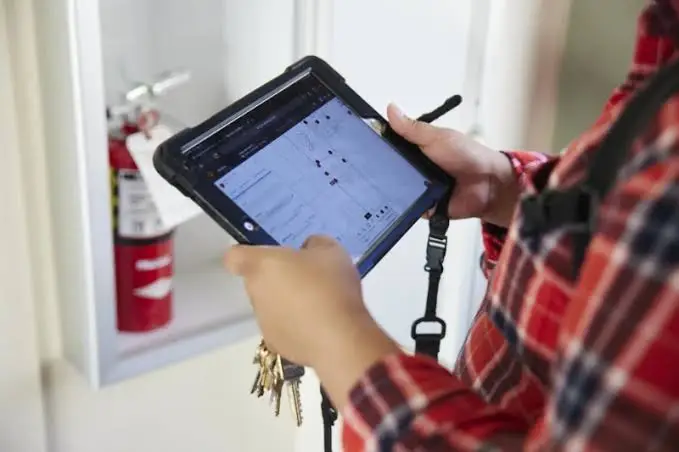
A CMMS closes that gap by generating PM work orders automatically based on calendar dates, meter readings, or condition data, assigning them to the right technician, attaching task instructions and required documentation, and giving whoever manages the program a live view of what’s overdue. Mobile access means technicians document measurements and readings at the asset in real time, instead of reconstructing the day from memory back at a desk, which is also what keeps your facilities maintenance reports accurate rather than approximate.
Step 7: Measure Compliance, Then Measure Whether It Means Anything
PM compliance (the percentage of scheduled tasks completed on time) is the easiest metric to track, and also the easiest one to misread. A team can hit 90%+ compliance every month while breakdowns keep climbing, because compliance only shows whether a work order was closed, not whether the work protected the asset. If you’re already tracking compliance and still getting surprised by failures, it’s worth reading how PM compliance turns into a vanity metric and what to track alongside it, such as Mean Time Between Failures and repeat-failure rates by asset.
Track compliance by individual asset, not portfolio average. An 85% overall rate can hide a critical asset sitting at 40% compliance, quietly heading toward its next breakdown while the dashboard looks fine.
Common Mistakes to Avoid
| Mistake | Why It Happens | Fix |
|---|---|---|
| Rolling out PM across all assets at once | Ambitious scope, no phased plan | Start with the top 20% most critical assets, prove the process, then expand |
| Designing tasks without technician input | Programs built in a meeting room, not on the floor | Involve technicians in task design; they know where real problems hide |
| Treating documentation as a formality | No consequence for a rushed checkmark | Require actual measurements, photos of wear items, and escalation triggers |
| Ignoring true labor capacity | Scheduled hours assumed to be usable hours | Subtract meetings, travel, and average emergency time before setting workload |
| Never revisiting intervals | “Set it and forget it” scheduling | Review failure data quarterly and adjust intervals up or down accordingly |
FAQ: How to Do Preventive Maintenance
How do I know where to start if we have no PM program at all?
Start with your most critical assets: the ones with no backup, no workaround, and the biggest consequence if they fail. Build a baseline from six months of work order history, then design and schedule tasks for that smaller group before expanding.
How often should preventive maintenance be performed?
It depends on the asset, its operating conditions, and its failure history, not a single universal number. Time-based intervals suit equipment on a predictable calendar (HVAC filter changes, safety inspections); meter-based intervals suit equipment where wear tracks usage more closely than time, such as vehicles or high-cycle machinery.
What’s the difference between preventive and predictive maintenance?
Preventive maintenance runs on a fixed schedule regardless of the equipment’s current condition. Predictive maintenance uses sensor data and condition monitoring to trigger work only when indicators suggest it’s actually needed. Most mature programs blend both; see this comparison of predictive maintenance vs preventive maintenance for a fuller breakdown of when each makes sense.
Do we need a CMMS to do preventive maintenance properly?
Not strictly, but manual tracking becomes unreliable fast as your asset count grows. A CMMS removes the dependency on memory, automates work order generation, and gives you the compliance and failure data needed to actually improve the program over time.
How do we know if our preventive maintenance program is working?
Track PM compliance alongside Mean Time Between Failures and your reactive-to-preventive work order ratio. If compliance is high but breakdowns and repeat failures aren’t dropping, the program is closing work orders without actually preventing failures, and the tasks or intervals need to be revisited.
Getting preventive maintenance right isn’t a one-time project, it’s a system that needs a place to live and grow. FacilityBot is a cloud-based CMMS software that gives facilities teams a single platform to plan, schedule, and track preventive maintenance without relying on spreadsheets or memory. As a complete facilities management solution, it combines dedicated preventive maintenance software with a built-in fault reporting software module, so scheduled PM work and reactive fault tickets both flow through the same system, with full visibility into compliance, asset history, and technician workload from one dashboard.
