Construction projects rarely fail because of one big mistake. They fall behind because of dozens of small ones: a missed inspection, a delayed material request, a work order buried in someone’s inbox, a subcontractor who never got the updated punch list. Individually, these are minor slip-ups. Together, they add weeks to a timeline and thousands of dollars to a budget.
This is exactly the problem construction work order management software is built to solve. By replacing scattered spreadsheets, paper forms, and email threads with a single, structured system, teams gain visibility into every task, every asset, and every deadline — before small issues become expensive ones.
In this guide, we’ll break down what construction work order management software actually does, why traditional tracking methods fall short, and how the right work order management software keeps projects moving from groundbreaking to final walkthrough.
What Is Construction Work Order Management Software?
Construction work order management software is a digital platform that helps project managers, site supervisors, and maintenance teams create, assign, track, and close out work orders across a construction project or facility. Instead of relying on paper tickets or disconnected messaging apps, teams use one centralized system to manage:

- Preventive and corrective maintenance tasks
- Punch list items and inspection follow-ups
- Equipment and asset repairs
- Subcontractor task assignments
- Material and resource requests
- Compliance and safety documentation
Unlike general project management tools, this software is purpose-built around the work order — a structured record that captures what needs to be done, who’s responsible, what resources are required, and when it must be completed.
Why Construction Projects Need Dedicated Work Order Management Software
1. Fragmented Communication Slows Everything Down
On most job sites, work requests come from multiple directions — site supervisors, safety inspectors, subcontractors, and clients. Without a centralized system, these requests get lost in text messages, verbal handoffs, or paper forms that never make it back to the office. Work order management software gives every request a single home, with a clear trail from creation to completion.
2. Manual Tracking Creates Blind Spots
Spreadsheets can’t tell you which tasks are overdue, which crew is overloaded, or which equipment is due for inspection. Construction work order management software automates these alerts, so managers catch problems while they’re still small.
3. Compliance and Safety Documentation Is Non-Negotiable
Construction sites operate under strict safety and regulatory requirements. Missing an inspection record or permit sign-off can halt a project entirely. Digital work orders create a timestamped, auditable record that’s easy to retrieve during inspections or disputes.
4. Delays Compound Across Trades
A late electrical inspection doesn’t just delay electrical work — it pushes back drywall, painting, and final inspection too. Software that tracks dependencies and deadlines in real time helps managers see these ripple effects before they happen.
Key Features to Look for in Construction Work Order Management Software
| Feature | Why It Matters |
|---|---|
| Mobile work order creation | Field teams can submit and update requests from the job site, no office trip required |
| Real-time status tracking | Managers see exactly what’s open, in progress, or overdue at a glance |
| Automated task assignment | Work orders route automatically to the right crew or subcontractor |
| Asset and equipment tracking | Tie work orders to specific machinery, tools, or building systems |
| Preventive maintenance scheduling | Recurring inspections and servicing are triggered automatically |
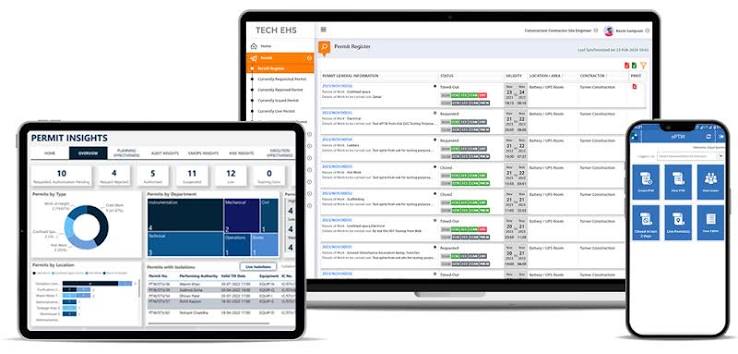
| Permit-to-work integration | High-risk tasks require sign-off before work begins, reducing safety incidents |
| Reporting and analytics | Track completion times, costs, and recurring issues across projects |
| Offline functionality | Crews working in low-connectivity areas can still log and update work orders |
How Work Order Management Software Improves Project Outcomes
Faster response times. Digital work orders eliminate the lag between a problem being spotted and a task being assigned. A cracked pipe or malfunctioning crane can be flagged and routed to the right team in minutes, not hours.

Better cost control. With every work order tied to labor hours, materials, and equipment usage, project managers get accurate, real-time visibility into where budgets are being spent — and where they’re at risk of overrunning.
Stronger accountability. Every work order has an owner, a deadline, and a status. There’s no ambiguity about who’s responsible when something falls behind.
Reduced equipment downtime. Preventive maintenance scheduling means machinery and tools are serviced on schedule, reducing the unplanned downtime that stalls entire crews.
Cleaner audit trails. Regulatory bodies and clients increasingly expect documented proof of inspections, repairs, and safety checks. A digital record makes this instant to produce.
Construction Work Order Management Software vs. Traditional Methods
| Traditional Methods (Spreadsheets, Paper, Email) | Work Order Management Software | |
|---|---|---|
| Task visibility | Limited, often outdated | Real-time, centralized |
| Communication | Scattered across tools | Unified in one platform |
| Compliance records | Manual, easy to lose | Automated, audit-ready |
| Response time | Hours to days | Minutes |
| Reporting | Manual compilation | Automated dashboards |
| Scalability | Breaks down on larger projects | Scales across multiple sites |
Choosing the Right Work Order Management Software for Your Projects
Not every platform is built for the realities of construction work. When evaluating options, consider:
- Does it work offline? Job sites don’t always have reliable connectivity.
- Can it scale across multiple projects or locations? Growing contractors need software that grows with them.
- Does it integrate permit-to-work processes? High-risk construction tasks need built-in safety sign-off, not an afterthought.
- Is it easy for field teams to adopt? Software only works if crews actually use it — look for simple, mobile-first interfaces.
- Does it offer preventive maintenance scheduling? Reactive repairs cost more than planned ones.
Frequently Asked Questions
What is the difference between work order management software and a CMMS? A CMMS (Computerized Maintenance Management System) is often broader, covering ongoing facility and asset maintenance, while construction work order management software is typically focused on managing tasks across active projects. Many platforms, including FacilityBot, combine both capabilities so teams can manage construction workflows and long-term facility maintenance in one system.
Can construction work order management software handle subcontractor coordination? Yes. Most platforms allow work orders to be assigned directly to subcontractors, with status updates, deadlines, and documentation tracked in the same system used for in-house teams.
Is work order management software worth it for small construction firms? Even small teams benefit from reduced miscommunication and better tracking, especially as the number of active projects grows. Many platforms offer scalable pricing so smaller firms aren’t paying for enterprise-level features they don’t need.
How does work order management software support safety compliance? By linking work orders to permit-to-work processes, inspection checklists, and timestamped records, the software creates an auditable trail that simplifies compliance reporting and reduces safety risks.
Keep Every Project Moving with FacilityBot
FacilityBot is a cloud-based CMMS and facilities management platform built to help teams manage work orders, permit-to-work processes, and asset maintenance from a single, mobile-friendly system. For construction and facilities teams juggling multiple sites, subcontractors, and compliance requirements, FacilityBot centralizes task assignment, real-time status tracking, and preventive maintenance scheduling — with AI-enabled features that help flag risks and recurring issues before they cause delays. Whether you’re managing a single build or a portfolio of ongoing projects, FacilityBot gives your team the visibility needed to keep work on track and on budget.
Want to see how FacilityBot can streamline your work order management? [Get in touch with our team] to schedule a demo.